
Get designs done fast with Skills
Smart workflows crafted for every use case

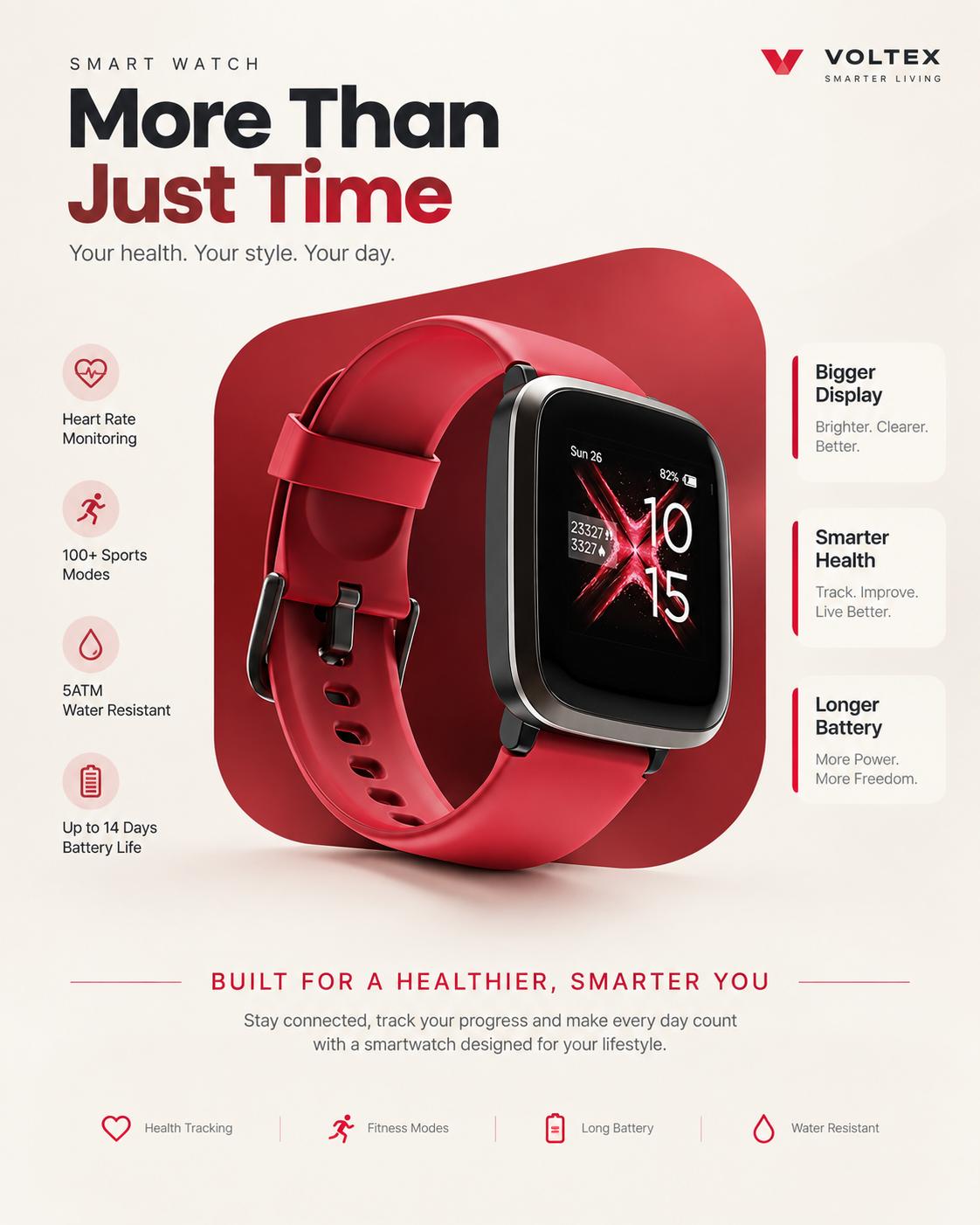
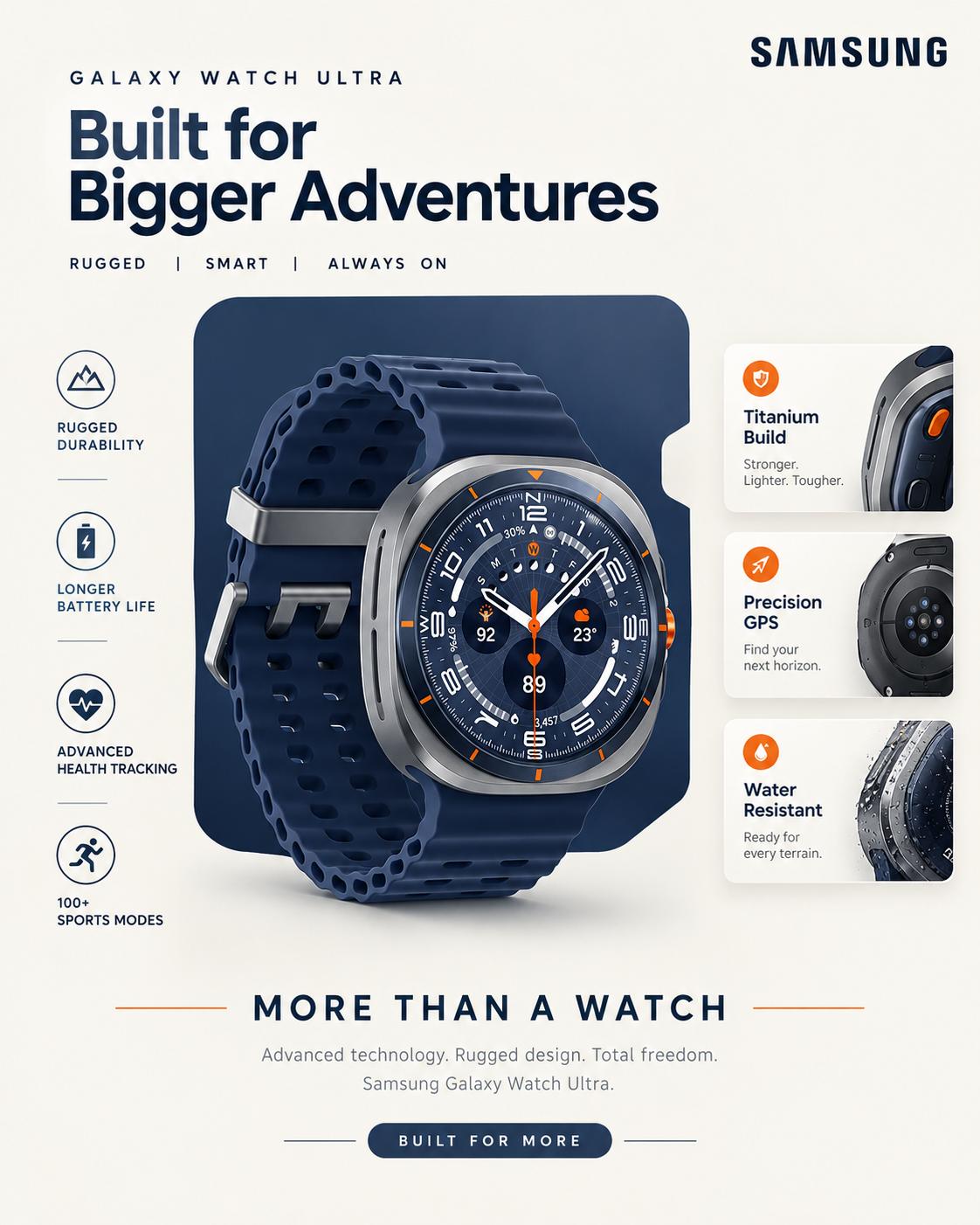
Smartwatch e-commerce ad AI prompt | Premium 4:5 social media poster

Sahil Rajput
8 Followers
76 Posts
9 Likes
120 Copies


0
LIKES
5
COPIES
200
VIEWS
Stay ahead with Indiater
Get fresh AI prompts, ideas & inspiration every day.
# MASTER PROMPT — LOCKED E-COMMERCE PRODUCT AD TEMPLATE

**Create a premium 4:5 vertical e-commerce product advertisement using the uploaded product image as the primary product reference and the shared reference image as the EXACT DESIGN BLUEPRINT.**

## 1. DESIGN BLUEPRINT — ABSOLUTELY LOCKED

The reference image defines the complete visual template.

**Do NOT create a new composition.
Do NOT redesign the layout.
Do NOT reinterpret the visual style.
Do NOT move, resize, remove, or rearrange major elements.**

Reproduce the same underlying design system every time:

* Same 4:5 vertical canvas
* Same overall composition
* Same visual hierarchy
* Same central product placement
* Same oversized rounded background panel
* Same top-right brand area
* Same headline position
* Same feature-card arrangement
* Same side information blocks
* Same product overlap relationship with the background panel
* Same bottom slogan structure
* Same bottom description area
* Same spacing rhythm
* Same proportions
* Same negative-space balance
* Same typography hierarchy
* Same rounded-corner language
* Same icon-and-feature presentation
* Same premium commercial advertising aesthetic

**The reference image is a TEMPLATE, not an inspiration to reinterpret.**

The final result must look like the **same advertising campaign/template being used for a different product.**

---

# 2. PRODUCT — VARIABLE ELEMENT

Use the **uploaded product image** as the exact product being advertised.

Replace the reference product completely with the uploaded product while preserving:

* product shape
* proportions
* geometry
* materials
* surface finish
* buttons
* ports
* screens
* controls
* logos present on the actual product
* straps/accessories
* distinctive product details

Do not invent product features or alter the physical design.

The uploaded product is the **primary visual focus**.

Place it in the same central/lower-central position and at approximately the same visual scale relative to the canvas as the reference product.

The product should overlap the main colored background panel in the same manner as the reference.

Maintain realistic premium product photography with:

* sharp edges
* realistic reflections
* realistic material rendering
* natural shadows
* subtle contact shadow
* dimensional depth
* polished commercial photography quality

Do not turn the product into an illustration or generic 3D object.

---

# 3. COLOR SYSTEM — ADAPTIVE, BUT CONTROLLED

Analyze the uploaded product image and identify its:

* dominant color
* secondary color
* accent color
* neutral tones
* metallic/material tones

Build the advertisement's **color palette from the uploaded product**.

The large central background panel, accent lines, icons, feature-card accents, separators and other colored graphic elements should adapt to the product's dominant visual color family.

### IMPORTANT:

**Color changes are allowed.
Layout changes are NOT allowed.**

For example:

* Red product → sophisticated red/crimson accent system
* Blue product → sophisticated blue/cobalt accent system
* Green product → sophisticated green/emerald accent system
* Black product → premium charcoal/black accent system
* White product → elegant neutral + controlled accent system
* Purple product → refined violet/plum accent system
* Orange product → warm orange/amber accent system

Do not simply flood the entire design with the product color.

Maintain the same **color hierarchy and contrast relationships** as the reference.

The adaptive palette should feel like the same template naturally recolored for the new product.

---

# 4. BACKGROUND — LOCKED STRUCTURE

Use a clean, warm off-white/light neutral background similar to the reference.

Maintain:

* minimal background
* subtle tonal depth
* clean premium appearance
* generous negative space
* soft studio lighting

Do not introduce:

* landscapes
* rooms
* lifestyle environments
* busy textures
* random objects
* decorative scenery
* unrelated visual elements

The background must remain minimal and product-focused.

---

# 5. MAIN COLORED PANEL — LOCKED SHAPE

Behind the product, reproduce the reference's large **rounded rectangular/organic graphic panel**.

Maintain its:

* approximate size
* position
* rounded corners
* side cut-in/notch structure
* relationship to the feature blocks
* relationship to the product
* overall silhouette

This panel is one of the strongest identifiers of the template.

**Do not replace it with a circle, gradient blob, abstract shape, photograph, or different layout.**

Only its **color palette** should adapt to the uploaded product.

---

# 6. TOP HEADLINE — LOCKED POSITION

Maintain the exact headline hierarchy from the reference:

### Small eyebrow/title

A short product-relevant phrase positioned above the main headline.

### Large headline

A bold, condensed, highly prominent uppercase headline occupying the same visual region as the reference.

Use product-relevant marketing copy based on the uploaded product.

The exact wording may change according to the product, but:

**TYPOGRAPHIC STRUCTURE, SCALE, POSITION, ALIGNMENT AND VISUAL WEIGHT MUST REMAIN CONSISTENT.**

Do not create a completely different headline layout.

Do not move the headline to another area.

Do not use excessive text.

---

# 7. FEATURE INFORMATION BLOCKS — LOCKED

Maintain the same **four-feature information system** surrounding the product.

### Upper-left feature block

Same position and rounded white/off-white card treatment.

### Upper-right feature block

Same position and card treatment.

### Lower-left feature area

Same position and relationship with the central panel.

### Lower-right feature area

Same position and relationship with the central panel.

Each feature should contain:

* simple product-relevant icon
* short feature/benefit
* concise supporting text where appropriate

The actual feature content should be derived **only from information visible/provided for the uploaded product**.

Never invent unsupported specifications.

If the uploaded product information is insufficient, use generic non-technical marketing wording rather than fabricating a specification.

### ICON RULE

Use simple clean line/iconography matching the reference.

Icons can change according to the feature, but:

* icon size remains consistent
* icon position remains consistent
* stroke/visual weight remains consistent
* icon-to-text spacing remains consistent

Do not introduce decorative illustrations.

---

# 8. PRODUCT OVERLAP — CRITICAL

The product must sit **in front of the central colored panel** exactly as the reference establishes the depth relationship.

Maintain:

**background → colored panel → information graphics → product foreground**

The product should visually dominate the composition.

Do not place the product completely inside the background panel.

Do not place it floating in a different location.

Do not create a lifestyle scene around it.

---

# 9. BRAND AREA

Maintain the small brand/logo region in the **top-right corner** with the same approximate scale and positioning as the reference.

If the uploaded product has a clearly visible brand/logo, use that brand identity appropriately.

If no brand is provided, use a clean minimal placeholder/brand treatment rather than inventing a real company logo.

Do not allow the brand area to become visually dominant.

---

# 10. BOTTOM CAMPAIGN LINE — LOCKED STRUCTURE

Maintain the reference's bottom slogan structure:

**WORD / WORD / WORD**

with small vertical separators between the words.

Use three concise product-relevant words.

Example structure:

**TRACK  |  MOVE  |  REPEAT**

The words may change according to the product, but:

* same position
* same typography style
* same spacing
* same separator treatment
* same alignment
* same visual scale

must remain consistent.

---

# 11. BOTTOM DESCRIPTION — LOCKED

Below the campaign line, maintain the same centered two-line descriptive text area.

Create a concise product-focused description based on the uploaded product.

Maintain:

* centered alignment
* similar line length
* similar font size
* similar line spacing
* same visual hierarchy
* same distance from the campaign line

Do not create paragraphs or excessive copy.

---

# 12. TYPOGRAPHY — STYLE LOCK

Typography must reproduce the **same visual hierarchy** as the reference:

* lightweight modern sans-serif for secondary text
* extremely bold condensed uppercase treatment for the primary headline
* clean modern sans-serif for feature information
* restrained uppercase typography for the bottom campaign line

Do not randomly change font personalities.

Do not use decorative fonts.

Do not use script fonts.

Do not introduce multiple unrelated typefaces.

Typography should feel like one cohesive premium commercial campaign.

---

# 13. SPACING & PROPORTIONS — LOCKED

Preserve the reference's spatial relationships.

The following must remain consistent:

* top margin
* headline spacing
* headline-to-product distance
* product-to-feature-card relationship
* side margins
* feature-card dimensions
* colored-panel dimensions
* product scale
* bottom slogan position
* description position
* overall negative space

**Do not optimize or rearrange the layout for the new product.**

If the uploaded product has a different aspect ratio, intelligently fit it into the **existing product position** while preserving its natural proportions.

---

# 14. ADAPTIVE CONTENT — ONLY WHAT CHANGES

The following elements are allowed to change:

### VARIABLE

* uploaded product
* product-specific headline wording
* four product-specific features
* feature icons
* three bottom campaign words
* short product description
* brand identity when supplied
* color palette derived from product

### LOCKED

* canvas ratio
* composition
* layout
* product placement
* product scale relationship
* graphic panel shape
* feature block positions
* typography hierarchy
* spacing
* alignment
* visual hierarchy
* overall design language
* lighting style
* premium advertising aesthetic

---

# 15. CONSISTENCY RULE

**This is a reusable design template.**

When this prompt is used with a completely different product, the output must still look like it belongs to the **same exact advertising campaign**.

A person should be able to place two generated posters side by side and immediately recognize:

> **Same template — different product.**

The AI must prioritize **template consistency over creative variation.**

Do not add creative variations between generations.

Do not generate alternate layouts.

Do not experiment with different compositions.

Do not reinterpret the reference.

---

# 16. QUALITY CONTROL

Before finalizing the image, verify:

* Is the uploaded product the main hero?
* Is the product physically accurate?
* Is the product in the same central position?
* Is the large rounded colored panel in the same location and shape?
* Are the four feature areas in the same positions?
* Is the headline hierarchy unchanged?
* Is the top-right brand area maintained?
* Is the bottom campaign line maintained?
* Is the description area maintained?
* Has the color palette adapted to the uploaded product?
* Has the layout remained unchanged?
* Are there any invented product specifications?
* Are there any unnecessary decorative elements?
* Does the result look like the same template applied to a different product?

**If any layout element has changed, correct it before producing the final image.**

---

## FINAL INSTRUCTION

**REFERENCE IMAGE = FIXED DESIGN BLUEPRINT.**
**UPLOADED PRODUCT = VARIABLE HERO PRODUCT.**
**PRODUCT COLORS = ADAPTIVE COLOR SYSTEM.**

**Change the product.
Adapt the colors.
Adapt the product-specific copy.
Keep everything else visually consistent.**

Create a **premium, photorealistic, commercially polished 4:5 e-commerce advertisement** that preserves the reference design system with extremely high structural consistency.

**Do not create a new design. Reproduce the established template for the uploaded product.**
0
LIKES
5
COPIES
200
VIEWS
Stay ahead with Indiater
Get fresh AI prompts, ideas & inspiration every day.
Claim +10 Bonus Credits
Submit your join/follow proof to earn 10 free prompt credits!
Uploading Proof...
Please wait while we secure your screenshot.
Thank You! 🎉
Proof submitted successfully!
Our admin will verify your proof and add +10 Credits to your account within 1–2 hours.